Why Does Audio Sometimes Sound Distorted After Processing?
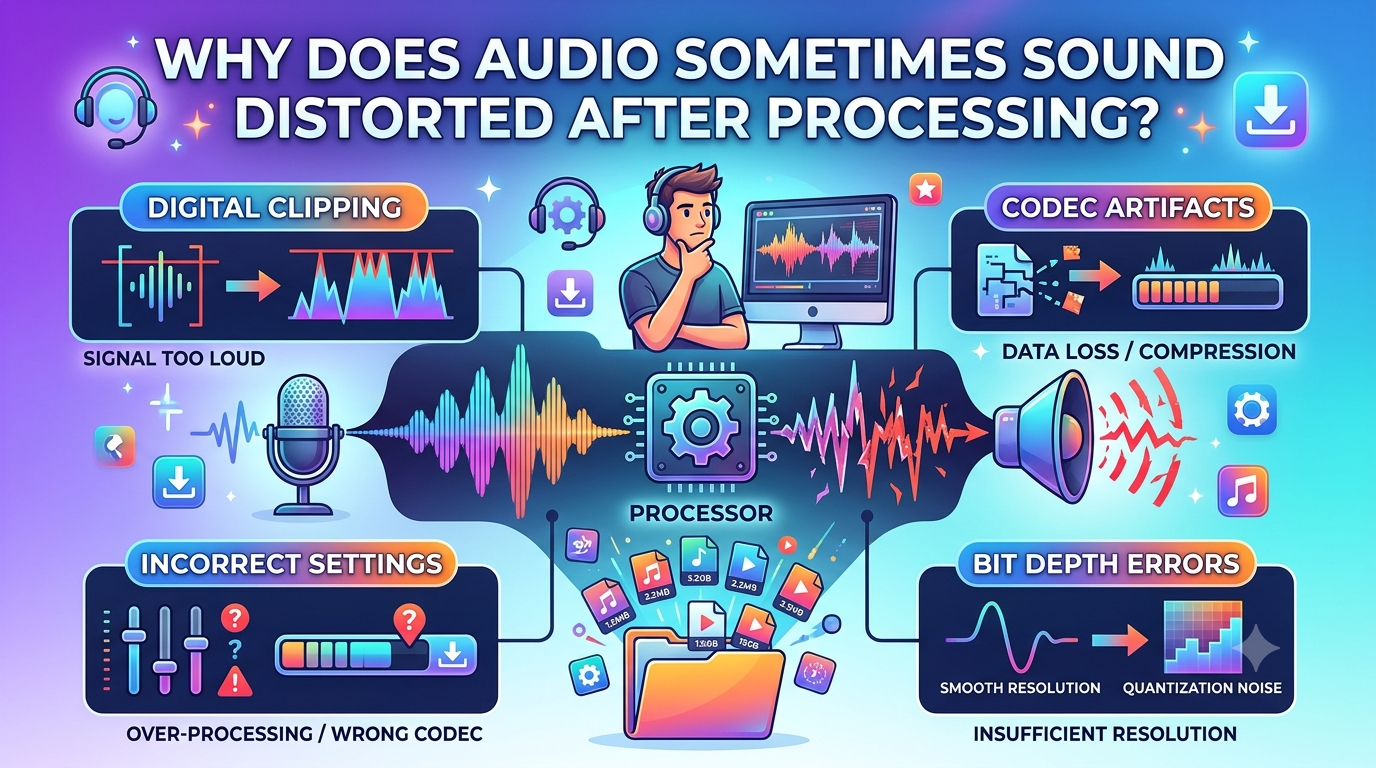
Audio processing can enhance sound by controlling volume, reducing noise, or changing file formats. However, for some reasons, the final audio sounds unclear, distorted, or different from the source audio. The reasons behind this are incorrect settings, low source quality, or too much conversion. Understanding these causes can help you keep your audio clean and enjoyable
When people convert a YouTube video into an audio file using a YouTube MP3 converter for offline listening, they may feel a significant difference in sound quality after conversion. The same thing can occur when editing, compressing, or exporting audio files. If you know these things beforehand, you can avoid it or choose the suitable settings.
What Does Audio Distortion Mean?
Audio distortion is when sound is changed in a way that is not wanted. You might hear crackling, buzzing, harsh tones, or indistinct details rather than clear voices, music, or instruments.
The distortion can be used on the entire recording or on parts of it. For instance, a song may sound normal when played softly, but rough when played loudly. Sometimes the processing can take away the natural tone from the voices.
Common Reasons Audio Sounds Distorted After Processing
Several factors can affect the final sound quality. Here are some common reasons.
1. Too Much Volume
Increasing the volume too much can cause clipping. Clipping happens when an audio signal exceeds what the system can handle. The loud parts lose their natural shape and may sound harsh or cracked.
To prevent this problem, avoid pushing volume levels to the maximum during editing. Leave enough space between the audio signal and the highest allowed level.
2. Excessive Compression
Compression reduces the difference between quiet and loud sounds. It can make audio levels more even, but too much compression may remove natural detail.
Music can start to sound flat, while voices may lose their normal character. Use compression carefully and compare the processed version with the original recording.
3. Low Bitrate Settings
Bitrate affects how much audio information is stored in a compressed file. A low bitrate can reduce file size, but it may also remove sound details.
This is especially noticeable in music with complex instruments or high-frequency sounds. Choosing a suitable bitrate can help balance file size and audio quality.
4. Repeated File Conversion
Converting the same audio file several times can reduce its quality, especially when using lossy formats. Each conversion may remove more sound information.
For better results, keep an original copy and export the final version directly from it whenever possible.
5. Incorrect Equalizer Settings
An equalizer changes different sound frequencies. Increasing bass or treble too much can make audio sound unbalanced. For example, strong bass may cover vocals, while excessive treble can make music sound sharp.
Use small adjustments and listen to the full recording before saving it.
How Audio Downloading Tools Can Affect Sound Quality
An example of a tool that people may use when preparing online audio for offline listening is a Flvto audio downloader. The end quality may differ depending on the source, available output options, and conversion settings.
A downloaded file cannot be more detailed than the source recording. Going with a higher bitrate can help you avoid losing quality in the encoding process, but it will not bring back any details that are not there.
Simple Ways to Prevent Audio Distortion
You can follow these steps to improve the chances of getting clear audio:
- Use a good source: Start with a clean recording whenever possible.
- Check volume levels: Avoid clipping during editing and exporting.
- Choose suitable settings: Select a bitrate and format that match your needs.
- Avoid repeated conversions: Work from the original file instead of converting copies again and again.
- Apply effects carefully: Make small changes to compression, equalization, and noise reduction.
- Listen before sharing: Test the final file with headphones and speakers.
Conclusion
Audio can sound distorted because of many factors such as high volume levels, too much compression, low bitrate settings, double conversion, or incorrect equalizer adjustments. Many of these factors are controlled by using a good-quality source file and selecting suitable processing settings. Whether you are editing music or using an audio download tool, always compare the output result with the source recording. A few careful checks can help preserve clear sound and make your audio more enjoyable to listen to.

 Polish
 English
 Arabic
 French
 Spanish
 Portuguese
 Deutsch
 Turkish
 Dutch
 Russian
 Romaian
 Portuguese (Brazil)
 Greek